I Tried to Plug a Camera into My Laptop. It Turned into a Networking Lesson
What started as a simple attempt to connect a camera over Ethernet turned into a hands-on lesson in PoE, static IPs, DHCP, and packet capture.
- Published
- Nov 08, 2025
- Read Time
- 7 min read
- Words
- 1,507
- views
- —
- Author
- @zuanki
Activity
views/week
last 24 weeks
Activity
views/week
last 24 weeks
The task sounded simple enough: take an industrial camera, plug it into my laptop with an Ethernet cable, and start reading image data.
I thought I'd be done in five minutes. I was very wrong.
What followed was a series of "Why isn't this working?" moments that sent me down a rabbit hole of PoE, Layer 2 vs. Layer 3, and eventually, the very normal experience of turning my laptop into a DHCP server just to talk to a camera.
The Part I Thought Would Be Easy
The camera used an RJ45 cable—a standard Ethernet cord. My brain immediately went: great, one cable, plug and play.
But when I connected it directly to my laptop, nothing happened. No signal, no blinking lights, just dead silence. The strange thing was, when this camera was connected to the manufacturer's PC cluster, it streamed perfectly.
The missing piece was PoE (Power over Ethernet).
Some industrial devices don't just use the Ethernet cable for data; they expect that same cable to provide their power. My laptop's Ethernet port, of course, does not output power. Neither did the new switch I had just bought (a TL-SG1016D). I had accidentally bought the "dumb" version instead of the PoE-capable one (usually marked with a P, like the TL-SG1016PE).
While waiting for a PoE Injector to arrive, I decided to go on a "side quest."
An Unexpected Side Quest
The Wi-Fi in my room is notoriously flaky, often lagging during SSH sessions from my laptop to my PC. I figured if I couldn't talk to the camera yet, I could at least fix my own local setup by connecting my two machines via Ethernet.
Could I have just worked directly on the PC? Sure. But I prefer my laptop’s dev environment, and honestly, treating the PC like a remote server felt like a good habit to build. [1]
Attempt 1: Laptop PC (Directly) I used a single cable to bridge the two. Still nothing.
Attempt 2: Laptop Switch PC I added the switch in the middle. Finally, link lights!
Checking on both machines:
# Laptop
$ ip a
enp2s0: <BROADCAST,MULTICAST,UP,LOWER_UP> mtu 1500 ...
       link/ether 60:18:95:56:8e:ff brd ff:ff:ff:ff:ff:ff

# PC
$ ip a
enp3s0: <BROADCAST,MULTICAST,UP,LOWER_UP> mtu 1500 ...
       link/ether d8:43:ae:c7:d6:76 brd ff:ff:ff:ff:ff:ff
Both network cards were UP,LOWER_UP (meaning the physical link was good). But I couldn't ping or ssh.
The "Aha!" Moment: A Switch is Not a Router
This was the point where it finally clicked: the switch was doing exactly what it was designed to do — and absolutely nothing more.
It was operating at Layer 2 (Data Link). It could see MAC addresses and forward frames, but it didn't know anything about IP addresses. I was so used to home routers doing the "boring stuff" for me that I forgot: on this tiny Ethernet island, there was no DHCP Server to hand out IP addresses.
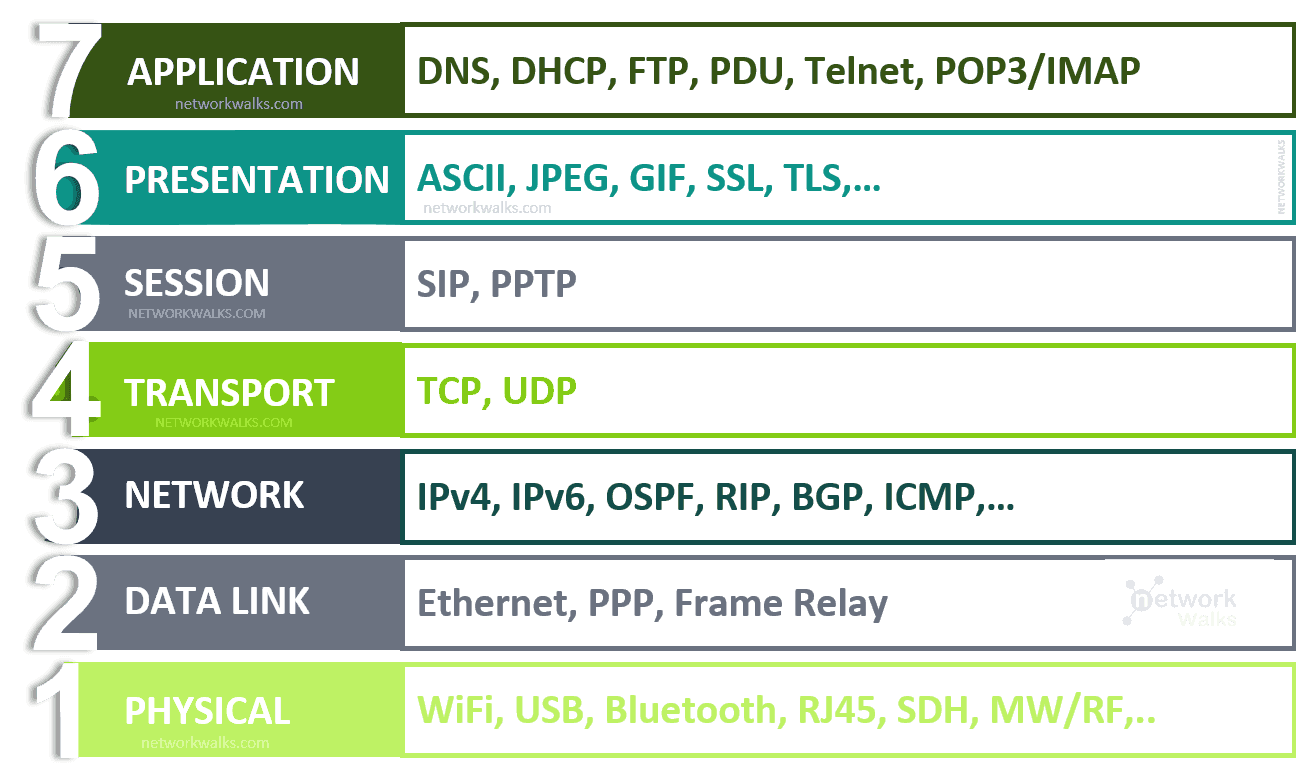
The Fix: Assigning Static IPs.
I manually gave both machines an identity in the 10.0.0.0/24 range.
# On Laptop
sudo ip addr add 10.0.0.1/24 dev enp2s0
sudo ip link set enp2s0 up

# On PC
sudo ip addr add 10.0.0.2/24 dev enp3s0
sudo ip link set enp3s0 up
And...
# On Laptop
$ ssh my-user@10.0.0.2
Welcome to Ubuntu ...
Success. ssh my-user@10.0.0.2 worked instantly. It was the first genuinely satisfying moment of the day.
Back to the Camera, This Time with a Consumer One
While waiting for the PoE injector to arrive, I grabbed a consumer IP camera from Tapo to keep experimenting. My goal was to set up an internal RTSP stream that would be both secure (not going through the company's cloud) and fast.
I plugged the camera into the switch.
And immediately ran into a new problem.
- I already had a
10.0.0.0/24network, with my laptop sitting at10.0.0.1. - But the camera gave me no interface to manually assign a static IP.
- It was clearly designed to be "plug and play", which in practice meant: it expected someone on the network to be a DHCP server.
So at this point, my network was just the laptop (10.0.0.1) and the camera (no IP yet), both connected to the switch.
The obvious question became: what exactly is the camera trying to do on the wire?
Listening to the Network
arp-scan
My first instinct was to try an ARP scan and see whether anything responded. ARP (Address Resolution Protocol) is what maps IP addresses (Layer 3) to MAC addresses (Layer 2).
$ sudo arp-scan --interface=enp2s0 --localnet
...
Ending arp-scan 1.10.0: 256 hosts scanned in 1.842 seconds. 0 responded
Nothing.
That was disappointing, but it also made sense in hindsight. The camera did not have an IP yet, so it was not going to respond to ARP packets asking who owned a given IP address.
tcpdump
So I stopped asking the network questions and started listening instead.
I ran tcpdump on enp2s0 to capture everything passing through that interface:
$ sudo tcpdump -i enp2s0 -n
...
11:32:31.913390 IP 0.0.0.0.68 > 255.255.255.255.67: BOOTP/DHCP, Request from 8c:90:2d:13:ba:e6, length 285
There it was.
That was the clue I needed.
Anatomy of a DHCPDISCOVER Packet
Once I broke that line down piece by piece, it became much easier to read:
11:32:31.913390: The timestamp.IP 0.0.0.0.68: The source. The camera has no IP yet, so it uses0.0.0.0. Port68is the DHCP client port.> 255.255.255.255.67: The destination. This is the broadcast address. The camera is effectively yelling to the whole network: "IS ANYONE A DHCP SERVER?" Port67is the DHCP server port.Request from 8c:90:2d:13:ba:e6: The packet came from this MAC address. I checked the label on the bottom of the camera, and it matched perfectly.
So this was a DHCPDISCOVER packet: the first step in the 4-step DORA process.
Fine, I’ll Be the DHCP Server
At that point, the next step felt almost inevitable:
if the camera wanted a DHCP server, then fine — I would be the DHCP server.
My laptop was running Ubuntu. It could absolutely do that.
I installed isc-dhcp-server and configured /etc/dhcp/dhcpd.conf. I did not want to hand the camera some random address; I wanted it pinned to a fixed one.
# /etc/dhcp/dhcpd.conf
default-lease-time 600;
max-lease-time 7200;
authoritative;

# My internal network
subnet 10.0.0.0 netmask 255.255.255.0 {
  # Assign IPs in this range
  range 10.0.0.10 10.0.0.20;
  # Gateway (is my laptop)
  option routers 10.0.0.1;
}

# This is the important part: DHCP Reservation
# I'm pinning the camera's MAC address
# to a fixed IP I want it to have
host tapo_cam {
  hardware ethernet 8c:90:2d:13:ba:e6;
  fixed-address 10.0.0.50;
}
After starting the service, I followed the logs with journalctl -u isc-dhcp-server -f:
Nov 08 11:37:28 zuanki dhcpd[12418]: DHCPDISCOVER from 8c:90:2d:13:ba:e6 via enp2s0
Nov 08 11:37:29 zuanki dhcpd[12418]: DHCPOFFER on 10.0.0.50 to 8c:90:2d:13:ba:e6 via enp2s0
Nov 08 11:37:29 zuanki dhcpd[12418]: DHCPREQUEST for 10.0.0.50 (10.0.0.1) from 8c:90:2d:13:ba:e6 via enp2s0
Nov 08 11:37:29 zuanki dhcpd[12418]: DHCPACK on 10.0.0.50 to 8c:90:2d:13:ba:e6 via enp2s0
Watching DORA Happen
This log is the 4-step DORA exchange in its full glory:
- Discover: The camera (
8c:90:2d:13:ba:e6) broadcasts a DHCPDISCOVER. - Offer: My laptop (
dhcpd) replies: "I have IP10.0.0.50for you" (DHCPOFFER). - Request: The camera confirms: "Great, I'll take IP
10.0.0.50" (DHCPREQUEST). - Acknowledge: The laptop finalizes: "Ok, IP
10.0.0.50is yours" (DHCPACK).
And the result was exactly what I wanted:
# On Laptop
$ ping 10.0.0.50
PING 10.0.0.50 (10.0.0.50) 56(84) bytes of data.
64 bytes from 10.0.0.50: icmp_seq=1 ttl=64 time=1.56 ms
That finally did it. The camera had an IP, and I could watch the stream through: rtsp://<user>:<pass>@10.0.0.50:554/stream
Conclusion
What I like about this whole mess is that every failure pointed to a different layer of the stack.
First it was power. Then physical link. Then IP addressing. Then DHCP.
What started as "just connect the camera" somehow turned into a tour through PoE, static IPs, the difference between switches and routers, packet capture with tcpdump, and finally running my own DHCP server with a static reservation.
It was also a good reminder that networking concepts only feel abstract until a very real device refuses to work. At that point, those layers stop being theory and start becoming your debugging checklist.
Now I am just not sure whether that industrial camera will be as polite as this Tapo one when the PoE injector arrives.
But that is a story for another day.