Introduction
At some point, every developer stumbles across a benchmark where a GPU crushes a CPU by 100×, and their first reaction is: "okay, but surely that's cherry-picked."
It's not. In the right workloads, the gap is very real — and understanding why changes how you think about algorithm design entirely.
CUDA is NVIDIA's programming model for harnessing that gap. But it isn't just an API. It's a different mental model — one where you redesign algorithms around how the hardware actually works.
A classic example: thrust::sort in large workloads with linear memory access can be tens to hundreds of times faster than std::sort on a CPU, depending on the architecture and data. Not because the GPU is magic, but because the algorithm and hardware are aligned.
The FlashAttention
A few years ago, most people assumed the bottleneck of Transformers was compute — specifically the cost of self-attention. Tri Dao disagreed.
His paper, FlashAttention, showed the real bottleneck was memory movement and IO efficiency, not compute.
The problem wasn't that the GPU was slow at matrix multiplications. The problem was that reading and writing the enormous Q, K, V matrices back and forth between Global Memory (HBM) and SRAM (fast on-chip memory) was eating all the time.
The solution was Kernel Fusion: instead of running separate kernels for , Softmax, and — each writing intermediate results back to Global Memory — FlashAttention does the entire chain in a single kernel, using Shared Memory as a cache to minimize round trips.
The result: significant speedups (often 2–3× in practice, depending on workload) in GPT-2 training.
This is a strong illustration of the core idea: to optimize GPU performance, you have to understand the hardware and memory system you're running on, not just the math.
The CUDA Mental Model
CUDA is a programming model for talking to GPU hardware directly. To actually use it well — not just copy-paste kernels from StackOverflow — you need to internalize three things: how the hardware is laid out, how the execution model maps your code onto it, and how the memory system works.
The third one is where a large portion of performance often depends.
Hardware
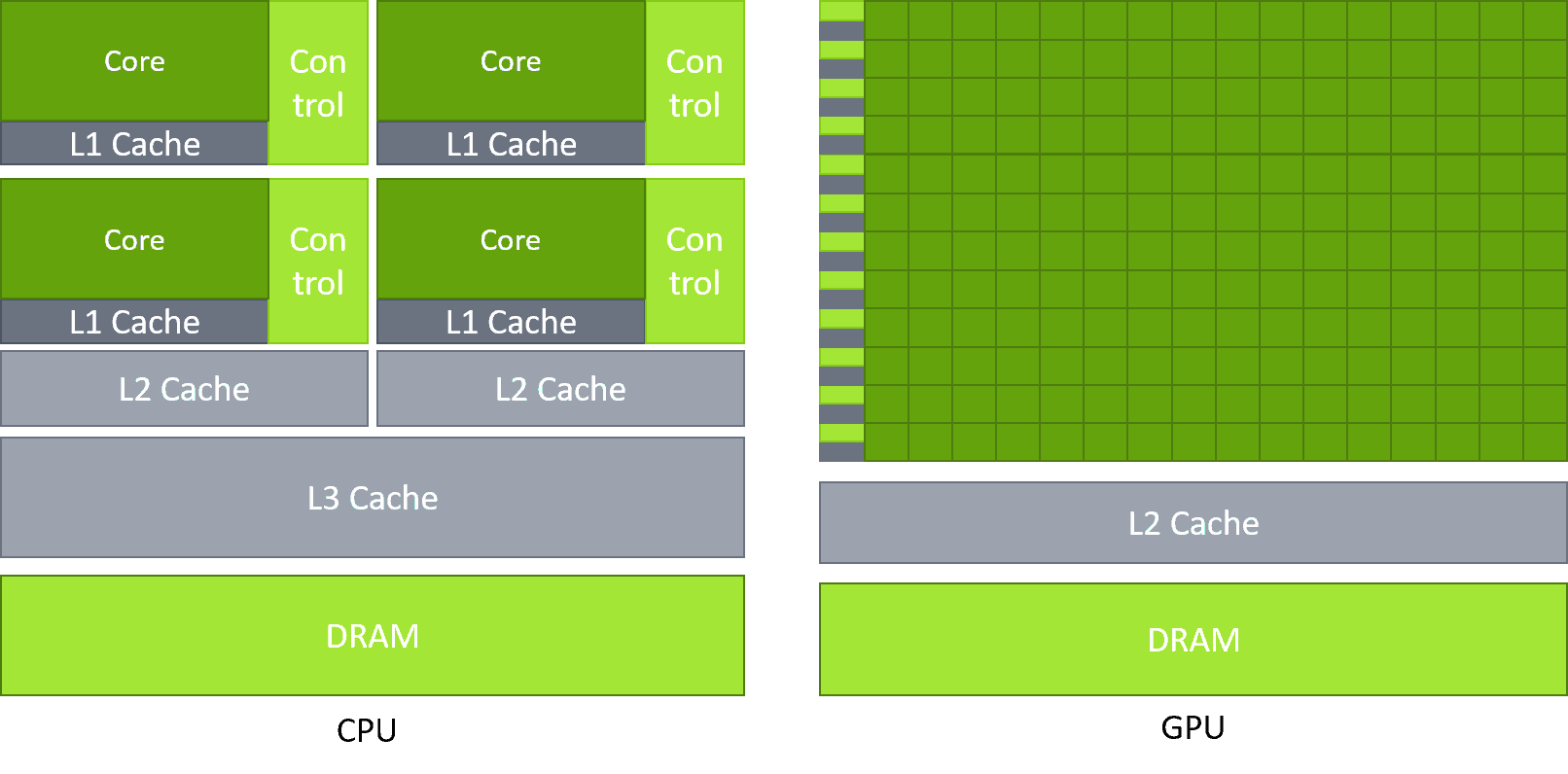
A CPU is designed for latency — a few powerful cores that can handle complex, branchy logic and context-switch fast. A GPU is the opposite: thousands of simpler cores optimized for throughput, doing the same operation on huge batches of data simultaneously.
Neither is better. They're just built for different jobs.
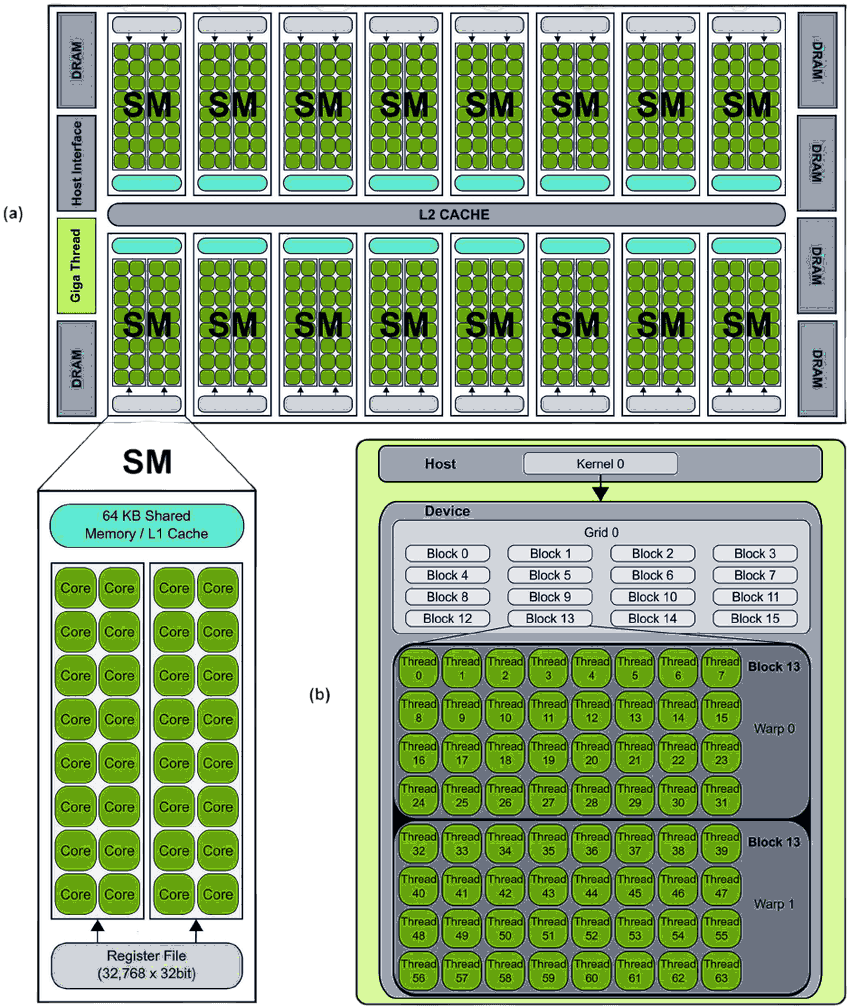
The main execution unit on the GPU is the SM (Streaming Multiprocessor) — the "heart" of the GPU. Each SM contains a number of CUDA cores (the exact number depends on the GPU architecture). Parallelism comes from two levels:
- Warp: A group of 32 threads. This is the scheduling unit of the SM.
- Latency Hiding: An SM simultaneously manages many warps (e.g., 64 resident warps). Think of it this way: Warp 1 kicks off a memory read — which takes hundreds of cycles. Instead of stalling, the SM immediately context-switches to Warp 2. Near-zero overhead. Then Warp 2 hits a wait, switches to Warp 3. By the time the SM cycles back to Warp 1, the data is ready. [1] However, if threads within the same warp follow different execution paths (a phenomenon known as warp divergence), the warp must execute each path serially — which can significantly reduce performance.
Note: Most CUDA performance optimizations revolve around the behavior of the 32 threads within a warp.
Execution Model: Grid, Block, Thread
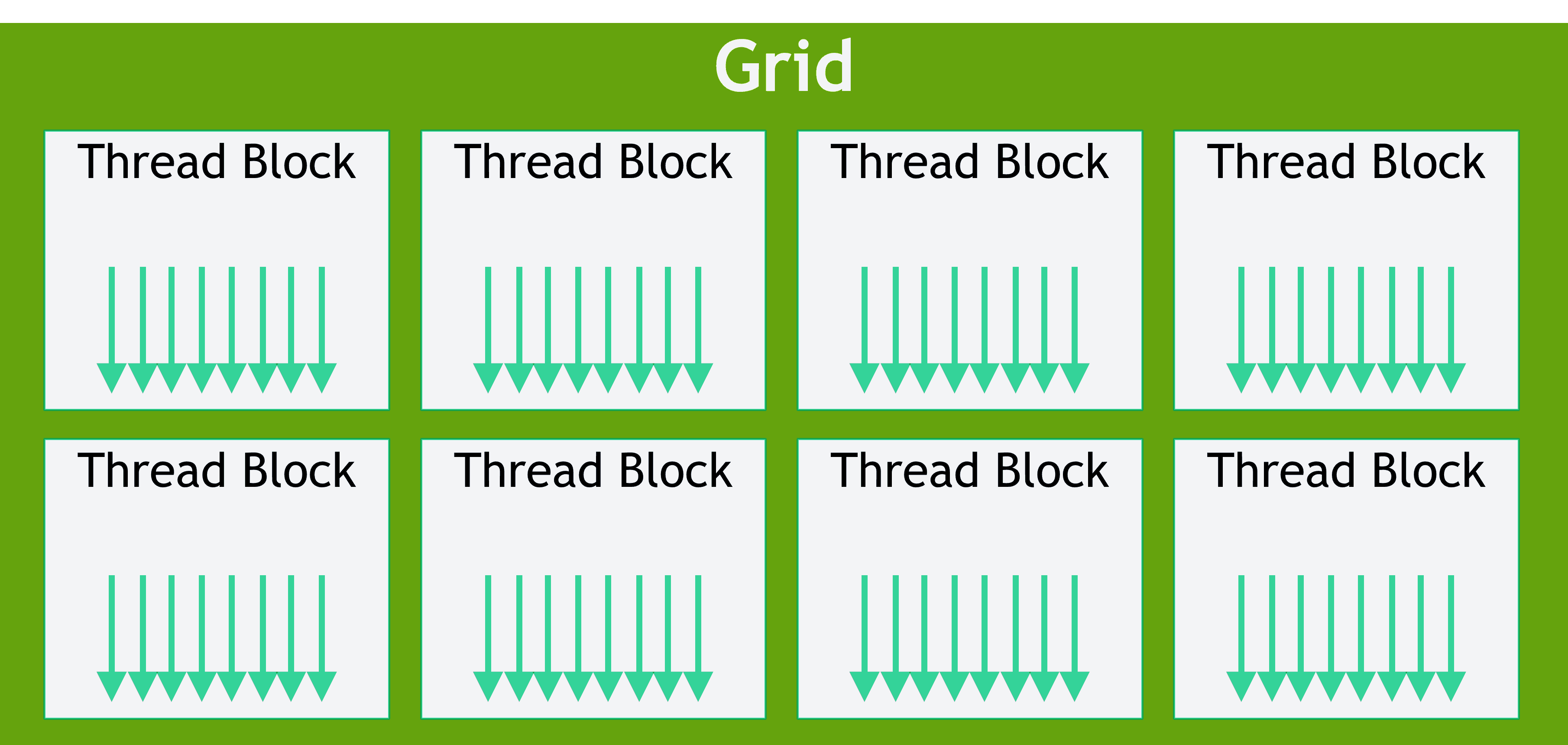
How does a programmer organize millions of threads? CUDA provides a three-level abstraction:
- Thread: The smallest unit, executes one copy of the kernel function.
- Block: A group of threads (up to 1024). Threads within the same block can communicate via Shared Memory.
- Grid: A group of blocks.
When you launch a kernel, you specify both dimensions:
kernel_function<<<GridSize, BlockSize>>>(parameters...);Physically, when a block is scheduled onto an SM, it gets divided into warps. A block of 1024 threads becomes warps.
Each thread knows its own position via built-in variables: blockIdx, threadIdx, blockDim, gridDim.
Below is the "Hello World" of CUDA: vector addition .
__global__ void vectorAdd(float *A, float *B, float *C, int N) {
    int idx = blockIdx.x * blockDim.x + threadIdx.x;
    if (idx < N) {
        C[idx] = A[idx] + B[idx];
    }
}

int main() {
    int N = 1000000;
    int threadsPerBlock = 256;
    int blocksPerGrid = (N + threadsPerBlock - 1) / threadsPerBlock;
    vectorAdd<<<blocksPerGrid, threadsPerBlock>>>(A, B, C, N);
}
The Memory System
The GPU has a hierarchical memory system. The faster the speed, the smaller the capacity.
| Memory Type | Location | Speed | Scope | Managed By? |
|---|---|---|---|---|
| Registers | On-chip (SM) | Fastest (~1 cycle) | Per Thread | Compiler |
| Shared Memory / L1 | On-chip (SM) | Very Fast (few cycles) | Per Block | Programmer (__shared__) |
| L2 Cache | On-chip (GPU-wide) | Fast | Entire Grid | Hardware |
| Global Memory (HBM/VRAM) | Off-chip | Very Slow (hundreds of cycles, depending on architecture) | Entire Grid | Programmer (cudaMalloc) |
| Constant Memory | Off-chip (cached) | Fast (if cache hit) | Entire Grid | Programmer (__constant__) |
Most kernels read from Global Memory and write back to it. Optimization is about minimizing those round trips by maximizing use of Shared Memory and Registers.
Two concepts that come up constantly:
-
Memory Coalescing: When the 32 threads in a warp access 32 contiguous memory addresses simultaneously, the GPU merges them into as few memory transactions as possible. Maximum bandwidth. If threads access memory randomly or with strides, you get multiple transactions and a serious bandwidth hit. [1]
-
Bank Conflict: Shared Memory is divided into 32 "banks". If two threads in the same warp access different addresses on the same bank, those accesses may be serialized — reducing parallelism. However, if multiple threads access the same address (a broadcast), this does not cause a conflict.
Stop Guessing: The Roofline Model
Okay, so your kernel is running slow. How do you fix it? Do you just start randomly tweaking block sizes?
No. You use Profiling-Guided Optimization (PGO), and specifically, the Roofline Model.
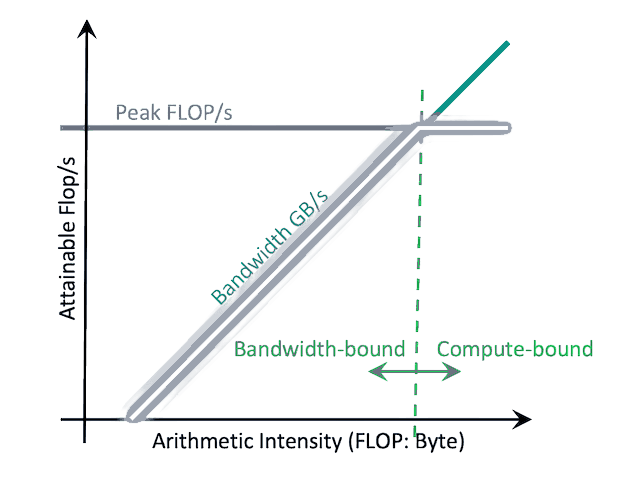
The Roofline Model answers one high-level question: "Is my code starving for data, or is it bad at math?"
- Y-axis (GFLOPS): How much raw math you are doing per second.
- X-axis (Arithmetic Intensity, AI): How many math operations you do per byte of memory you fetch.
When you run NVIDIA's profiling tools (Nsight Compute), it plots your kernel as a single dot on this graph.
- Under the Slanted Roof (Memory-Bound): You are starving for data. You're reading too much from Global Memory and not doing enough math with it. You need to increase Arithmetic Intensity. Fix uncoalesced accesses, or use Shared Memory as a cache (Kernel Fusion!).
- Under the Flat Roof (Compute-Bound): You are feeding data fine, but the math chips are maxed out. You need to do math faster. Time to switch from double to float, or leverage hardware Tensor Cores.
Final Thought
Learning CUDA is fundamentally a mindset shift. You stop looking at your code as a sequence of logic, and start looking at it as a traffic controller managing data flow across silicon. Respect the hardware, respect the memory bottlenecks, and the GPU can deliver performance that is difficult to achieve on conventional CPU architectures.